Lesson 6 of 8 · 11 min
Preventive plans, meters and stock levels
Written by Melek Mehrez, founder of FreeMaint · Last reviewed November 16, 2026
Lesson objective
By the end of this lesson, you can set up a calendar plan and a meter-based plan with their required parts, tell a meter-based plan from an automated trigger, and set the stock levels behind the low-stock alert and automatic purchase requisitions.
Lesson 8 of Implementing a CMMS, Starting preventive maintenance, gives the method. This lesson configures it: the schedule type, what a late job does to the next date, what a meter-based plan needs to fire, and the stock levels behind the parts the plans use.
A preventive plan is a promise that FreeMaint keeps for the client. Set badly, it keeps the wrong one: a meter-based plan that nobody feeds never fires, a statutory inspection slips later every year, and the oil filter is missing on the day of the service. And the indicators built on top, such as those of the SMRP Best Practices Metrics, can only measure what these settings let FreeMaint record.
Choose the schedule type
Every plan has a Schedule type: choose it from what drives the wear.
| Schedule type | What creates the work order | When it fits |
|---|---|---|
| Time Based | An interval: Every, then days, weeks, months or years | Wear that follows time, and obligations with a date |
| Meter Based | Readings on one meter: a work order each time it advances by the Threshold Value | Wear that follows use, when use varies: hours, cycles, distance |
| Hybrid | The calendar or the meter, whichever comes first | Wear that follows use but also ages with time |
| Specific dates | A list of dates, repeated every year | Seasonal or irregular work |
In EN 13306, the European maintenance terminology standard, work done at set intervals of time or use, without checking condition first, is predetermined maintenance. All four schedule types are predetermined.
Calendar plans: interval and reschedule mode
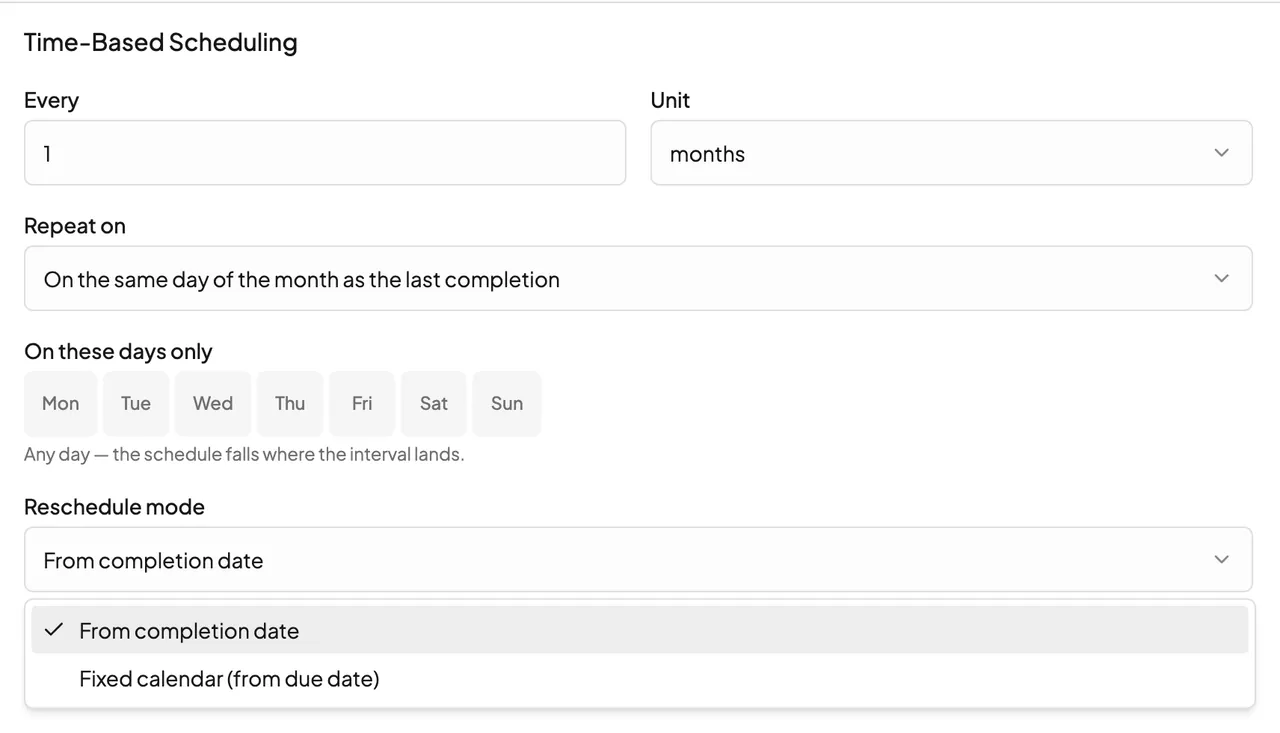
A Time Based plan starts at its Start Date, which is the first due date. In months, Repeat on can take a weekday, such as the first Monday, for work that needs a given shift or a planned stop; On these days only moves due dates off the days nobody is on site.
Reschedule mode decides what a late job does to the dates that follow.
| Reschedule mode | The next due date | When it fits |
|---|---|---|
| From completion date (the default) | Counted from the completion: a job two weeks late moves every later date by two weeks | Wear that restarts with the work: lubrication, filters, cleaning |
| Fixed calendar (from due date) | Stays on the calendar, whenever the last job was done | Dated obligations: statutory inspections, certificate renewals, contract visits |
Either way, a plan never stacks work orders: while its last one is open, it creates no other. Once that work order is closed, a fixed-calendar plan creates the occurrence it was held on, even if its date has passed, or only the latest one when a later date is already due too: it never creates one work order per missed date.
In FreeMaint
Included in Core (free)Calendar plans in FreeMaint
PM Schedules, under Preventive, lists the plans; Create PM Schedule opens the form. Time Based and Specific dates plans, with their tasks and Required Parts, are free on every subscription, without limit. With Auto-create work orders on, Advance notification (days before due) creates each work order that many days ahead.
Read the documentationMeter-based plans: meter, readings, threshold
A meter-based plan reads nothing by itself. It needs a meter, readings, a threshold and the meter's current position.
- 1
Create the meter
In Meters, New Meter: its asset, a type (Runtime for an hour meter), a unit, and Frequency, the days between two readings. A meter not read within its Frequency counts as overdue.
- 2
Plan the readings
Add Reading on the meter, a scan of its QR code, or a Meter reading step in a work order: each of these readings is checked against the plans and triggers. The reading asked when a job on the asset is completed only restarts the count of the plans that job satisfies: it never creates a work order. Schedule readings, on the meter's page, prepares a calendar plan that asks for it.
- 3
Set the threshold
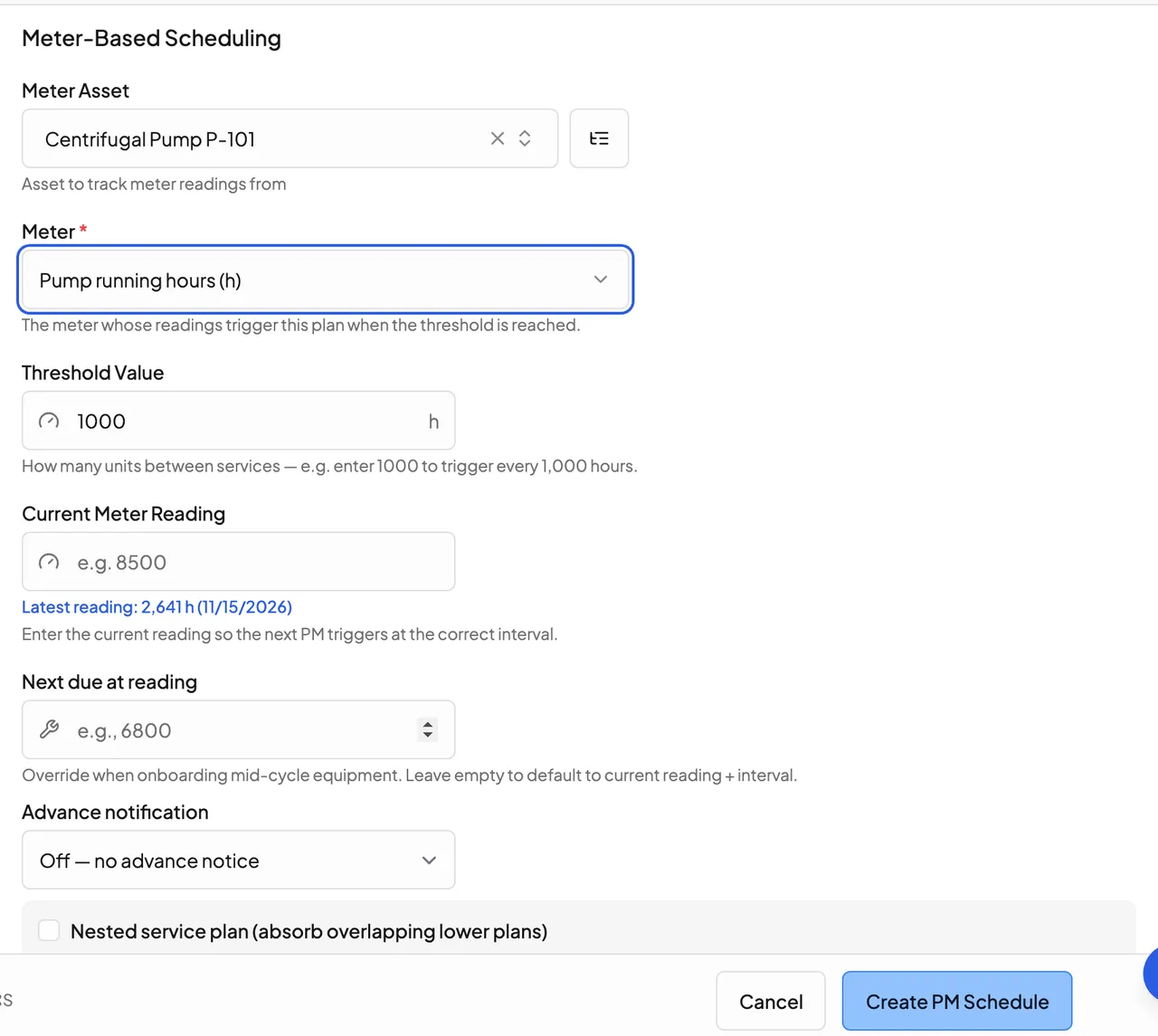
Choose Meter Based or Hybrid, then the Meter Asset, the Meter and the Threshold Value: 250 for every 250 hours.
- 4
Say where the meter stands
Enter the Current Meter Reading, or Next due at reading for a machine partway through its interval. Left empty, the plan counts from zero.
The first of those readings that shows the meter has advanced by the Threshold Value since the last service creates the work order, even with Auto-create work orders off. The count restarts when that work order is completed, from the reading entered then or the latest one. Advance notification can warn the people assigned before the service.
In FreeMaint
Included in StarterMeters and readings in FreeMaint
Creating meters, entering readings and adding Meter reading steps need Starter; viewing and deleting meters stay free. A meter-based plan can be saved on any subscription, but has nothing to count without them. Below Starter, readings can no longer be entered on a meter or by a Meter reading step, so plans stop firing.
Read the documentationA meter-based plan or an automated trigger?
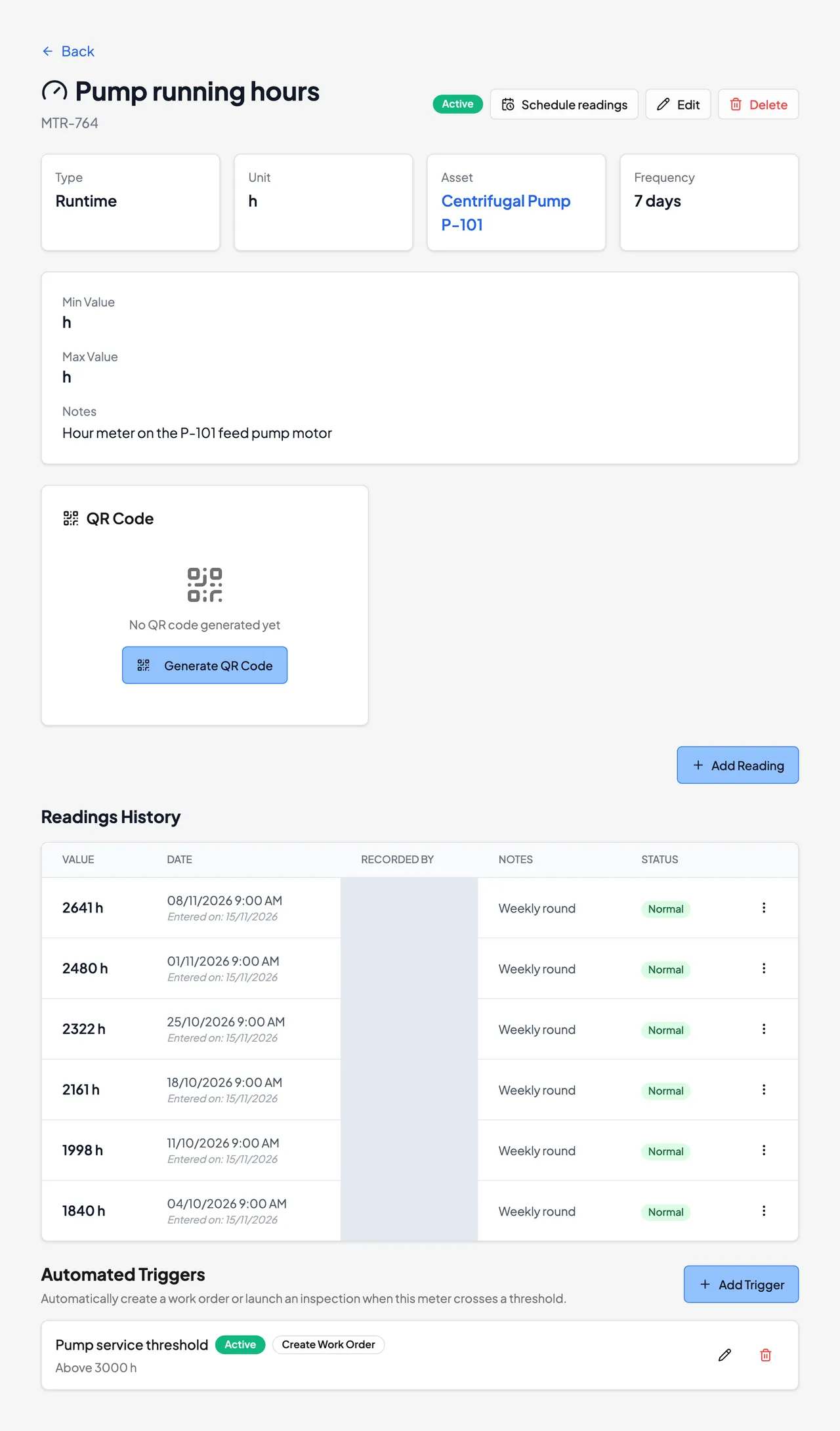
A meter's page also holds Automated Triggers: they watch the same readings, but answer a different question.
| Aspect | Meter-based plan | Automated trigger |
|---|---|---|
| Question | Has the machine run its interval since the last service? | Has a reading crossed a limit? |
| Compares each reading with | The reading at the last completed service | A fixed value: Above, Below, Equals, or Change (delta) exceeds |
| Creates | The plan's work order, with its tasks and required parts | A work order from its Work order title and description (without a title, it creates none), or an inspection |
| After it fires | Waits until that work order is completed | Switches itself off, unless Recurring: then it fires on every matching reading, after the wait you set |
| In EN 13306 terms | Predetermined maintenance | Condition-based maintenance when the meter measures a condition, such as a temperature or a pressure; on an hour meter, still predetermined |
An Above 250 trigger on a forklift's hour meter fires once and switches itself off; made Recurring, it fires on every reading above 250, for the rest of the forklift's life. Use plans for intervals, triggers for limits.
In FreeMaint
Included in StarterAutomated triggers in FreeMaint
Creating and testing a trigger needs Starter; listing them stays free. Below Starter, readings fire no trigger, and FreeMaint tells the company that its meter threshold automations stopped.
Read the documentationRequired parts travel with the work order
Required Parts lists the spare parts a service uses. Each work order carries them as planned parts; nothing is reserved or deducted until the technician records a part as used, so stock levels still decide when to order.
Stock levels: when to order, how much
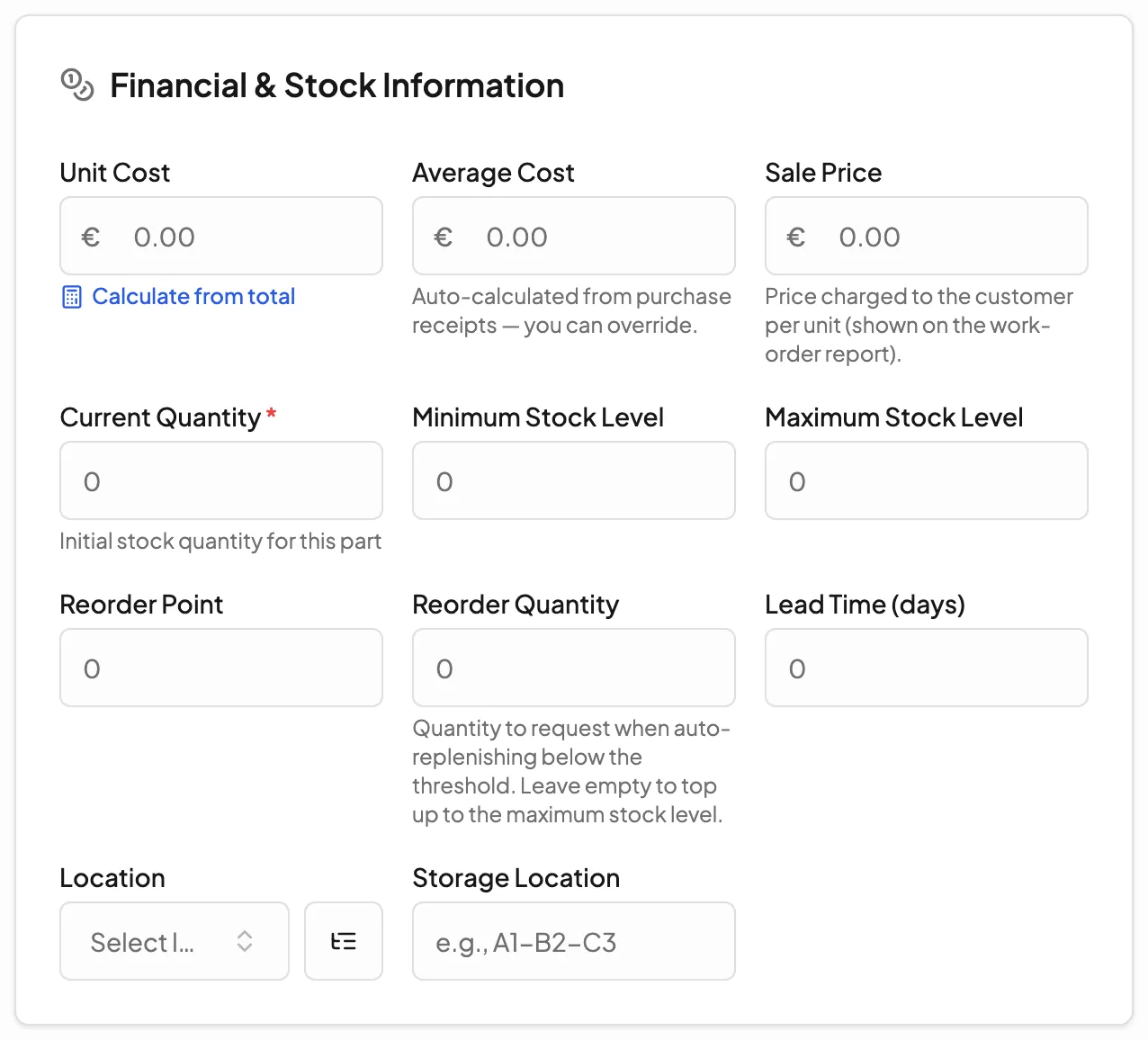
Each part carries its own levels, on its form.
| Field | What it means | How to set it |
|---|---|---|
| Minimum Stock Level | The safety stock you never want to go below | Enough to cover a failure while a late order arrives |
| Reorder Point | The level at which you order | The minimum plus what you use during the lead time |
| Maximum Stock Level | The ceiling of the shelf | Space, shelf life and cash tied up |
| Reorder Quantity | What an automatic requisition asks for | Left empty, it tops up to the maximum |
| Lead Time (days) | Days from order to delivery | The supplier's real delay, not the catalogue's |
The import of lesson 4 brings the minimum only, from its Min Quantity column: the other levels are typed on each part.
In FreeMaint
Included in BusinessStock transfers in FreeMaint
Moving parts between stores with Stock Transfers needs Business. It does not change the alert, which reads the total.
Read the documentationThe Low Stock page, under Inventory, lists the parts at or below their level. On Starter, Auto-create purchase requisitions adds each one to a single draft requisition for the company. A part already covered by an open purchase order or requisition is skipped. The draft belongs to nobody, so only a role that may update any requisition can review and submit it; then the approval workflow of lesson 5 applies.
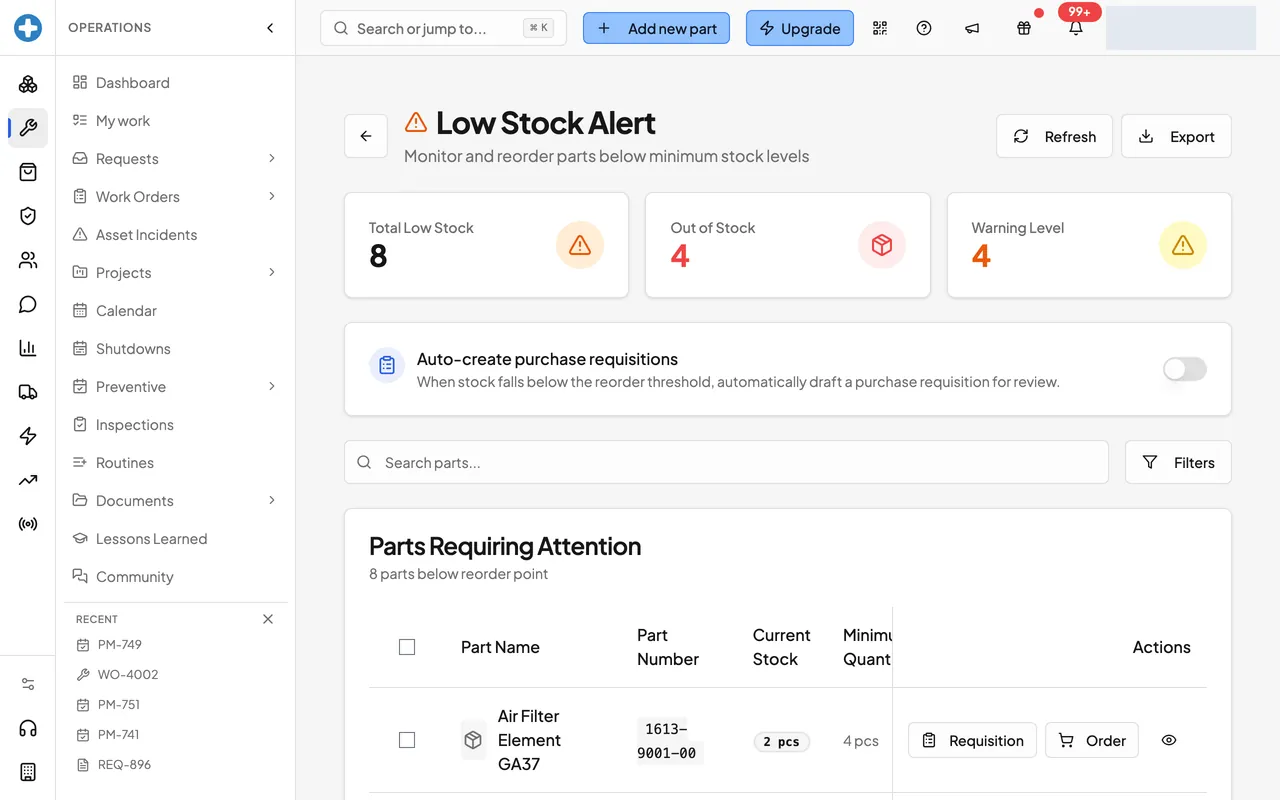
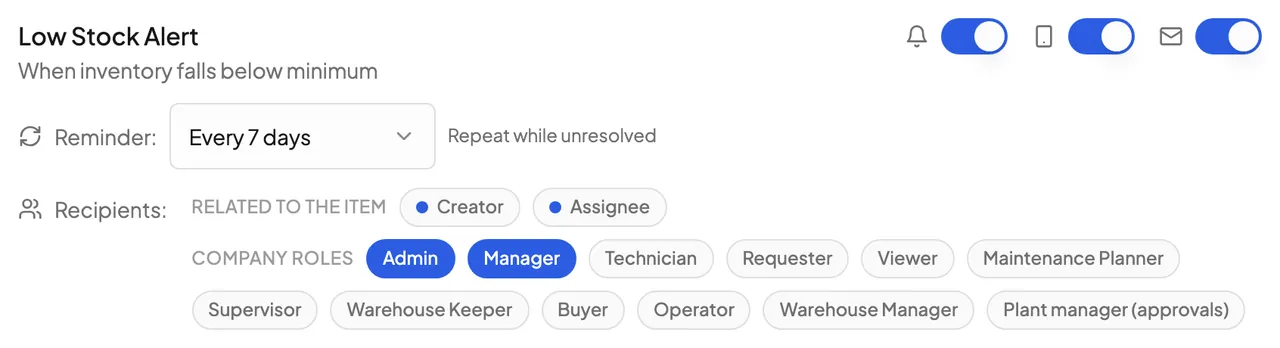
Low Stock Alert and Out of Stock are company notification events. In Company Settings › Notifications, Advanced notification configuration sets their channels, the roles that receive them and a Reminder while a part stays low. Send them to the people who order.
In FreeMaint
Included in Core (free)Stock levels and alerts in FreeMaint
Stock levels, the Low Stock page and both notification events work on every subscription. Choosing who receives a notification needs the permission to configure notifications.
Read the documentationIn FreeMaint
Included in StarterAutomatic purchase requisitions in FreeMaint
Auto-create purchase requisitions appears on the Low Stock page for those who may configure the CMMS, on Starter. The Academy trial does not include it.
Read the documentationExample
Plans and stock at Example Plant
At Example Plant, the course's snack bakery, wave 4 of the import, the preventive plans, waited for this lesson: a meter-based plan points to a meter, which must exist first. So the meters come first: one Runtime meter in hours per machine, with a Frequency of 7 days, on the forklifts EX-WH-FLT-01 to 03 and the compressors EX-UT-CMP-01 and EX-UT-CMP-02. A technician reads them on Mondays, through the plans that Schedule readings prepares. Once the meters exist, wave 4 imports the routine plans of the task list, each naming its asset and meter; the critical plans below are set up on screen, one at a time.
Each forklift gets a Meter Based plan, Threshold Value 250. EX-WH-FLT-01 shows 3,412 hours, but its last service, on paper, was at 3,300: you enter the dial as the Current Meter Reading and 3,550 as Next due at reading. From the dial alone, the first service would have come at 3,662, 112 hours late. The compressors get Hybrid plans, 2,000 running hours or 12 months, since the standby unit, EX-UT-CMP-02, runs little while its oil still ages; Required Parts lists one compressor oil filter.
The boiler, EX-UT-BLR-01, has a statutory inspection dated by its certificate: Time Based, every year, Fixed calendar (from due date), with Advance notification (days before due) at 45 days to book the inspector. The cold room's temperature gets a Gauge meter in °C on refrigeration unit 1, EX-CR-REF-01, since every meter belongs to an asset, with a Frequency of 1 day for the morning check. Its automated trigger, Above 5 °C, creates a work order titled “Cold room above 5 °C”: Recurring, with one day before re-triggering.
The compressor oil filter arrived with its minimum of 2. You add a Lead Time (days) of 10 and a Reorder Point of 3: the minimum plus what the compressors use in 10 days, well under one filter, rounded up to a whole one. The Maximum Stock Level is 6. Both stock events go to the storekeeper's role and to Admin, the maintenance manager's role. With Auto-create purchase requisitions on, at 3 filters left a draft requisition asks for 3. The storekeeper can submit only the requisitions they raised, so the maintenance manager submits this one, and the plant manager approves it.
Six common mistakes
- A meter-based plan on a meter that nobody reads.
- An Above trigger on an hour meter in place of a meter-based plan: it fires once, or on every reading.
- From completion date on an inspection with a legal date: each late inspection pushes the next one later.
- Current Meter Reading left empty on a machine in service: the next reading creates a work order at once.
- A stocked part with no reorder point and no minimum: it only warns when the shelf is empty.
- Counting on the import for the reorder point: it carries the minimum only.
Your turn: create a meter-based plan
The exercise of this lesson is checked in FreeMaint. In your own workspace, create a meter on an asset in Meters, then a plan with Schedule type Meter Based or Hybrid, that asset, that meter and a Threshold Value, saved Active, the default status.
What counts: an active plan that you created yourself, Meter Based or Hybrid, with a threshold above zero, on a meter that is active. Readings are not checked, though without them the plan will never fire. What does not: a Time Based plan, including the reading plan that Schedule readings prepares; a plan saved as Draft or Inactive; a plan someone else created, even if you edit it; an automated trigger, which is not a plan; sample data; a plan whose meter has been deactivated, or that was deleted before the check.
Meters and readings need the Starter plan. If your workspace is on Core and you manage it, starting this course opens a 30-day Academy trial there, once per workspace, that includes meters and their readings, and automated triggers. When the trial ends, your meter-based plan stays, but readings can no longer be entered on the meter, so it no longer fires.
Template for this lesson
Preventive and stock setup plan
Excel (.xlsx), blank, with automatic checks
Key takeaways
- Choose the schedule type from what drives the wear: time, use, both, or a list of dates.
- Fixed calendar keeps dated obligations on their date; From completion date restarts the interval from the job actually done.
- A meter-based plan needs a meter, readings and the meter's current position; without readings it never fires.
- A meter-based plan counts an interval from the last service; an automated trigger reacts when a reading crosses a limit.
- Required parts travel to each work order as planned parts; stock moves only when a part is recorded as used.
- Give every stocked part a minimum and a reorder point, and send the stock alerts to the people who order.
Exercise in FreeMaint
Do it in your own FreeMaint workspace, then check it here. Required: your certificate is issued once every exercise of this course is verified.
Create a meter-based preventive plan
Create an active preventive plan yourself that a meter drives: choose “Meter Based” or “Hybrid”, then the meter and its interval.
Required for the certificate.
Check your understanding
A few quick questions. Nothing is recorded.