Lesson 3 of 8 · 11 min
Custom fields and coding conventions
Written by Melek Mehrez, founder of FreeMaint · Last reviewed November 16, 2026
Lesson objective
By the end of this lesson, you can write a data dictionary for a client workspace, standard fields first and custom fields second, write the client's coding rule and decide where the codes live, and create your first two custom fields.
Lesson 5 of Implementing a CMMS, Structuring sites, locations and assets, gives the method: a short hierarchy, a coding rule, a criticality rating. This lesson turns it into configuration: which lists, codes and fields the client's workspace gets, who fills in each one, and when.
Every field you add is a question someone must answer, often on a phone, in a hurry. Too few, and decisions lack facts; too many, and people type anything to get past the form. ISO 14224, the reference taxonomy for reliability and maintenance data, makes the same trade-off: collecting data costs effort, so the effort should match its intended use.
The tool is a data dictionary: one row per field, grouped by record type, saying who fills it in and what it is for. ISO 55013 gives guidance on keeping data useful for asset management, and a presentation hosted by NIST puts it plainly: everyone uses their CMMS differently, so comparable data needs a standard structure and standard codes.
Standard fields, categories and failure codes first
Before creating any custom field, map each need of the client to what the workspace already has. An asset already carries a name, a category, an asset type, a criticality, a manufacturer, a model, a serial number and a barcode, which covers most “extra fields” asked for at the first meeting.
| The client wants to record | Put it in | Why |
|---|---|---|
| What kind of machine it is | An asset category, with sub-categories if needed | Asset lists filter on it, sub-categories included |
| Equipment, system or component | An asset type | Gives the level, apart from the kind of machine, so neither list repeats the other |
| How much a failure would hurt | Criticality | Already on every asset; a second criticality field would split the rating in two |
| What went wrong, why, what was done | Failure codes | Picked when a work order is completed |
| A fact specific to this client, used for a decision | A custom field | Only when nothing above fits |
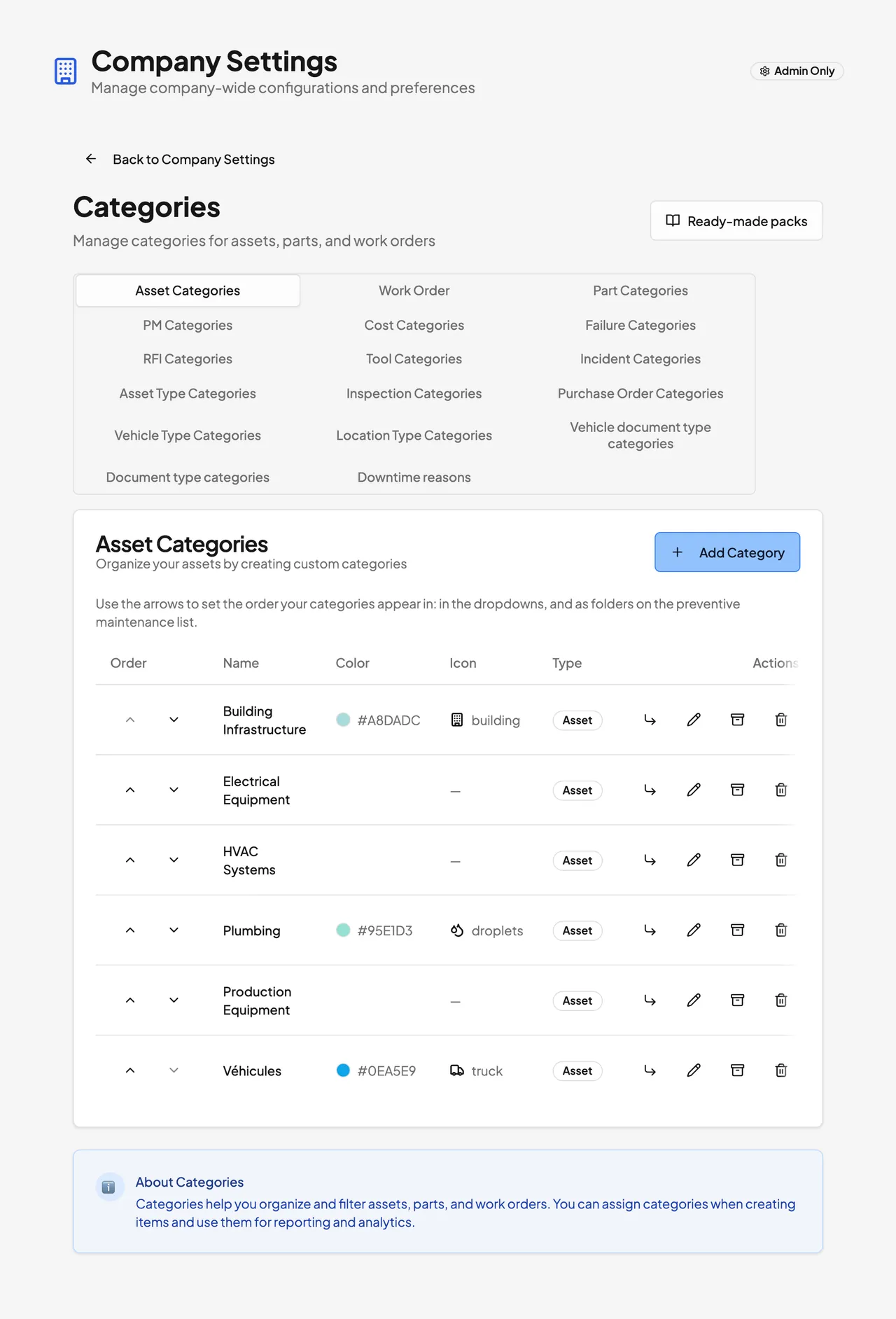
Categories holds more than fifteen lists, one tab each, from asset types to downtime reasons. Only asset categories take sub-categories, one level deep. A category still in use cannot be deleted, but it can be archived: it leaves the dropdowns, and records keep it.
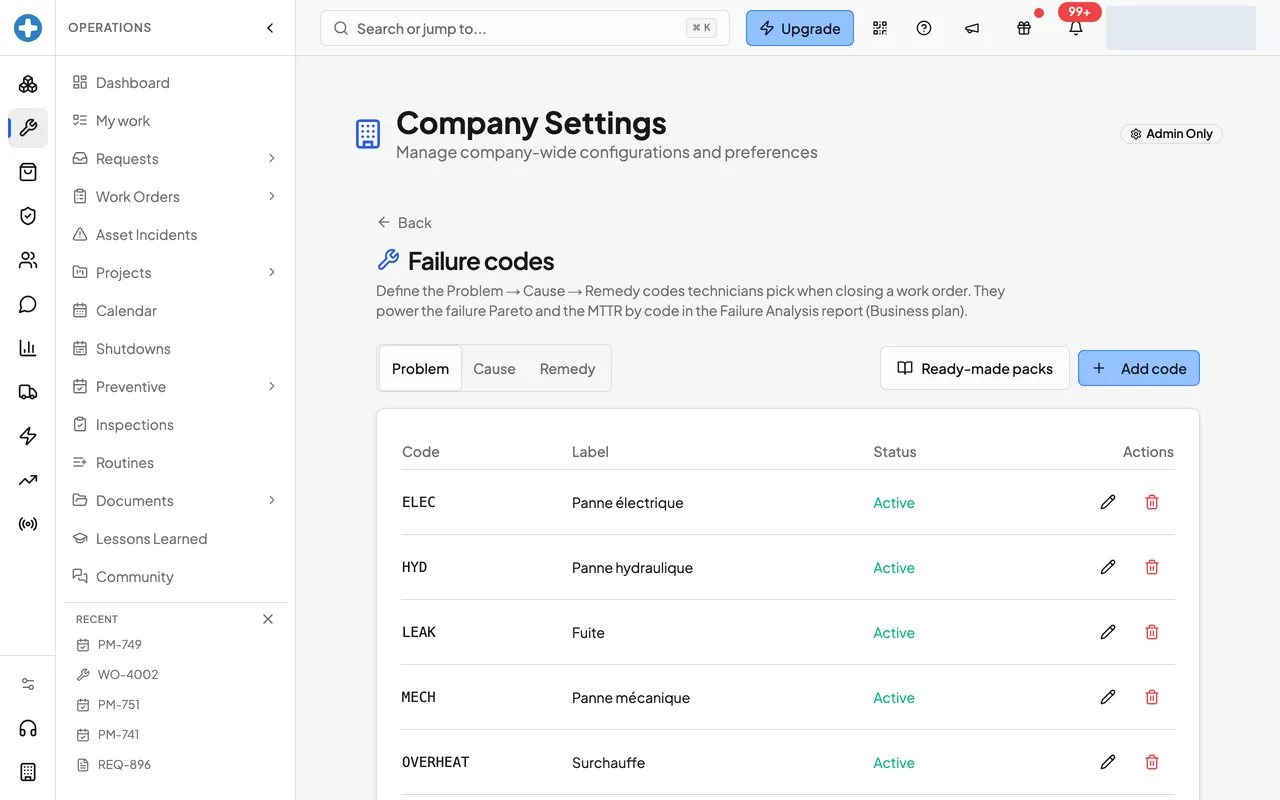
Failure codes are three linked lists: a problem is what the technician sees (“Leak”), a cause is why it happened (“Worn seal”), a remedy is what fixed it (“Seal replaced”). A cause can be attached to its problem, a remedy to its cause. Keep each list short and in the technicians' words.
ISO 14224 treats the equipment unit, level 6 of its nine levels, as the common level for reporting: a component's failure counts as a failure of its equipment. Write problem codes at that level, as the equipment shows the failure: the oven stops, whatever part failed. The cause can then name the component.
In FreeMaint
Included in Core (free)Categories and failure codes in FreeMaint
Both sit in Company Settings and are free on every plan. Categories has one tab per list, with Add Category, arrows that set the order of the dropdowns, and Add sub-category on asset categories. Failure Codes has three tabs, Problem, Cause and Remedy. To retire a code, untick Active: it leaves the picker, and work orders already tagged keep it. Deleting a code also removes it from those work orders and from the Failure Analysis report.
Read the documentationWhen a custom field earns its place
A custom field is justified when you can say who will use the value and for what, who knows it, and at what moment they can enter it. If you cannot name the use, do not create the field. Our study of what maintenance teams actually record found that they fill in the what and the where, and almost never the why.
Know what FreeMaint does with the values before promising anything. A custom field does not filter a list or feed a report. On work orders and requests, a step of an approval workflow can require it, or require a given value (lesson 5). Exports of assets, parts, work orders, requests, vendors and customers turn it into a column, which their imports read back. If the client wants to filter a list by it, it belongs in a category.
| Type | Example |
|---|---|
| Text | Drawing number |
| Long text | Cleaning instructions after work |
| Number | Rated flow in m³/h |
| Date | Last allergen validation |
| Single-choice list | Lubricant grade |
| Multiple-choice list | Allergens handled on the line |
| Checkbox | Food contact |
| Rating | Cleanliness after work, from 1 to 5 |
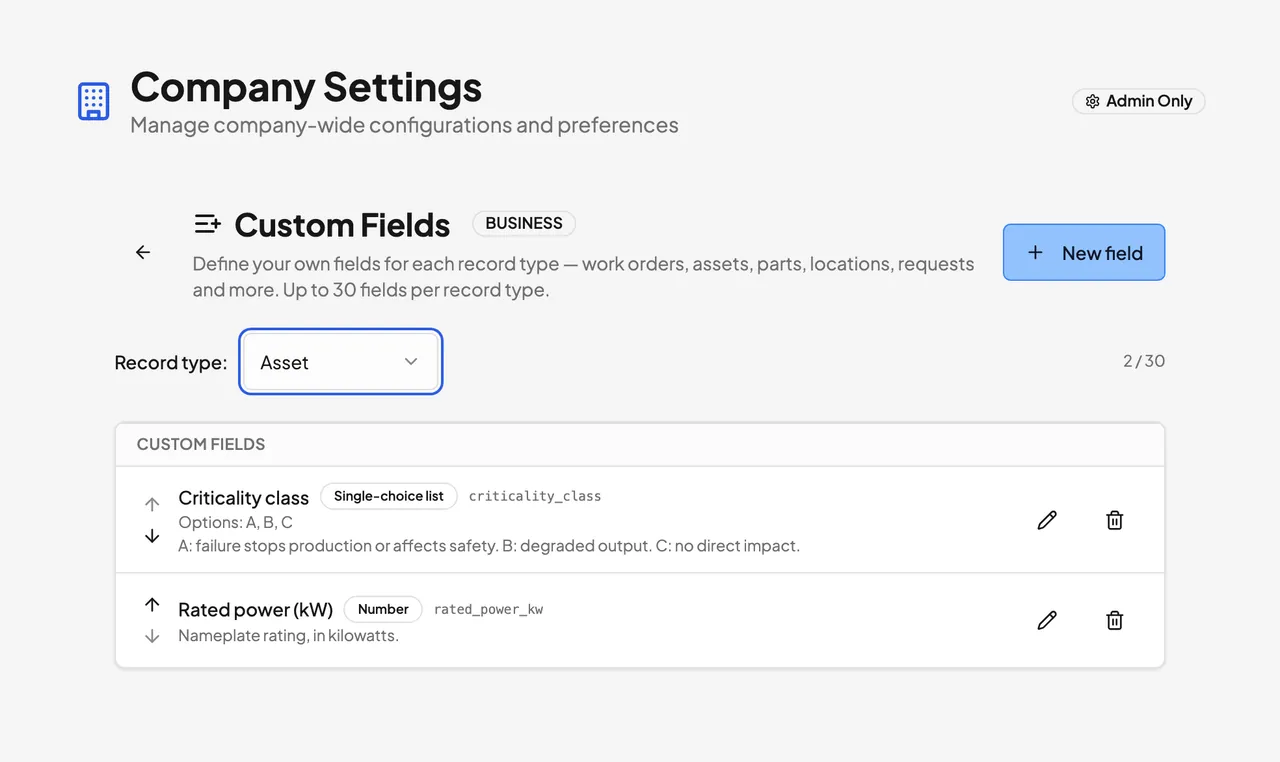
Each of the 13 record types, from Work order and Asset to Request and Meter, holds up to 30 custom fields. Once saved, a field's record type, type and internal ID are fixed; its name, options and rules can change. The internal ID comes from the name and labels the field's column in exports and imports: settle the name before saving.
Required, conditional, locked: who answers, and when
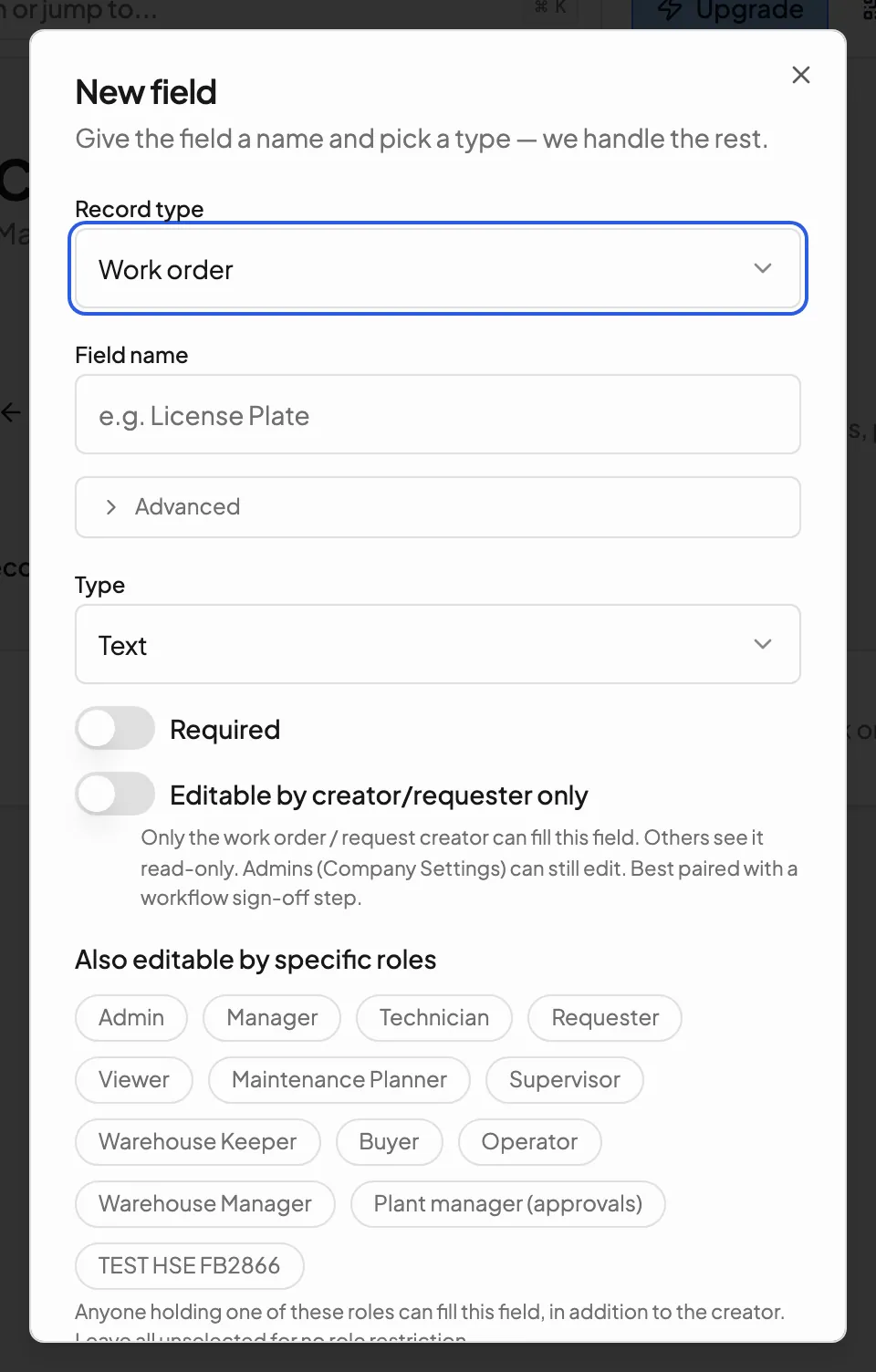
- Required depends on the record type. A request field is asked of whoever submits the request, even from a public QR page without an account. Work order fields form the closure form: a required one must be filled before the job is completed. Asset fields are filled on the asset's page or edit form.
- Conditional (“Only show when another field has a specific value”): the field appears only when a single-choice list or a checkbox of the same record type holds one of the values you pick. One level only; a hidden field is never required.
- Locked: “Editable by creator/requester only” works on work orders, requests and work permits; on a work order made from a request, the creator is the requester. “Also editable by specific roles” names up to 20 roles, on any record type. Everyone else sees the value read-only on the record's page. A role lock only narrows who may edit: holders of the named roles must still be allowed to edit the record itself (on a work order: update, close or validate it).
In FreeMaint
Included in BusinessCustom fields in FreeMaint
Company Settings › Custom Fields lists the fields by record type, with New field and arrows to order them. Creating, changing, reordering and deleting fields needs the Business plan; on every plan, people keep filling in existing fields. Deleting a field deletes its values too.
Read the documentationCoding: the reference and the client's code
FreeMaint gives every asset a reference when it is created, ASS- followed by a number by default. Nobody types it, and renaming or moving the asset does not change it: the safest key to point at one asset for years.
| Identifier | Set by | Unique | Use it for |
|---|---|---|---|
| Reference | FreeMaint | Yes, by default | A key that never changes |
| Barcode | You | With Unique asset barcodes on | The client's code, on labels |
| Serial Number | You | No | The manufacturer's number |
Duplicate barcodes only trigger a warning. Turn on Unique asset barcodes in Company Settings › System, and a code already in use is refused at creation, at edit and in imports; codes already shared stay as they are.
Locations say where an asset stands and its category what kind it is, so the code only has to pick out one asset. It may repeat the site or the type as readable hints, as in lesson 5 of Implementing a CMMS, but never anything that can change, such as the line of a machine that moves. The ISO/IEC 81346 series keeps these aspects apart in the same way.
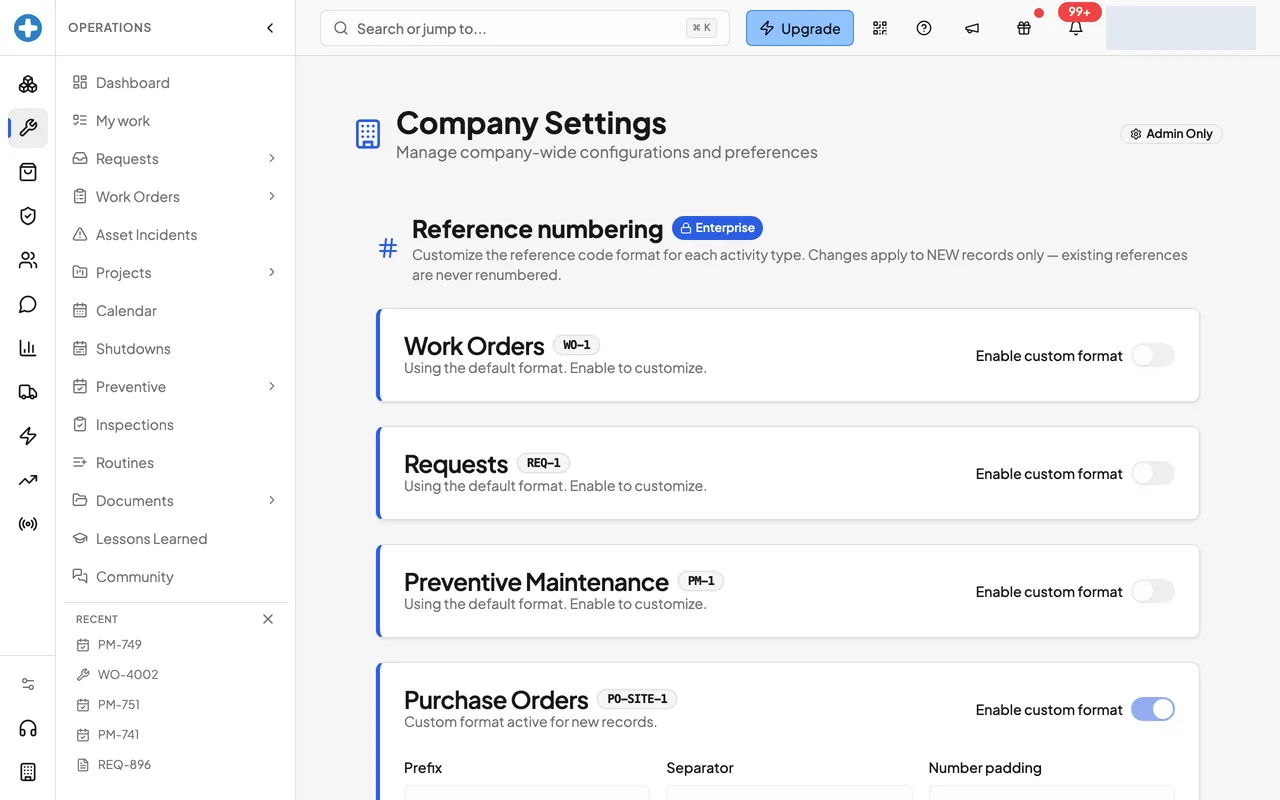
Reference numbering sets the format of new references: prefix, separator, year, month or day, number padding, a monthly or daily reset, and the site's code, for work orders, requests, preventive plans, purchases, assets and more. With a reset, keep the year and month (and day) in the format, or references repeat. Existing references are never renumbered: set the format before the first import. Write the client's rule on the template's Coding rule sheet: the site, area and type codes, the format, and where the code goes.
In FreeMaint
Included in EnterpriseReference numbering in FreeMaint
Company Settings › Numbering shows the format of each record type. Changing it needs the Enterprise plan; otherwise the page is read-only and references keep the default format, such as ASS-12 or WO-345.
Hide what the client will never fill in
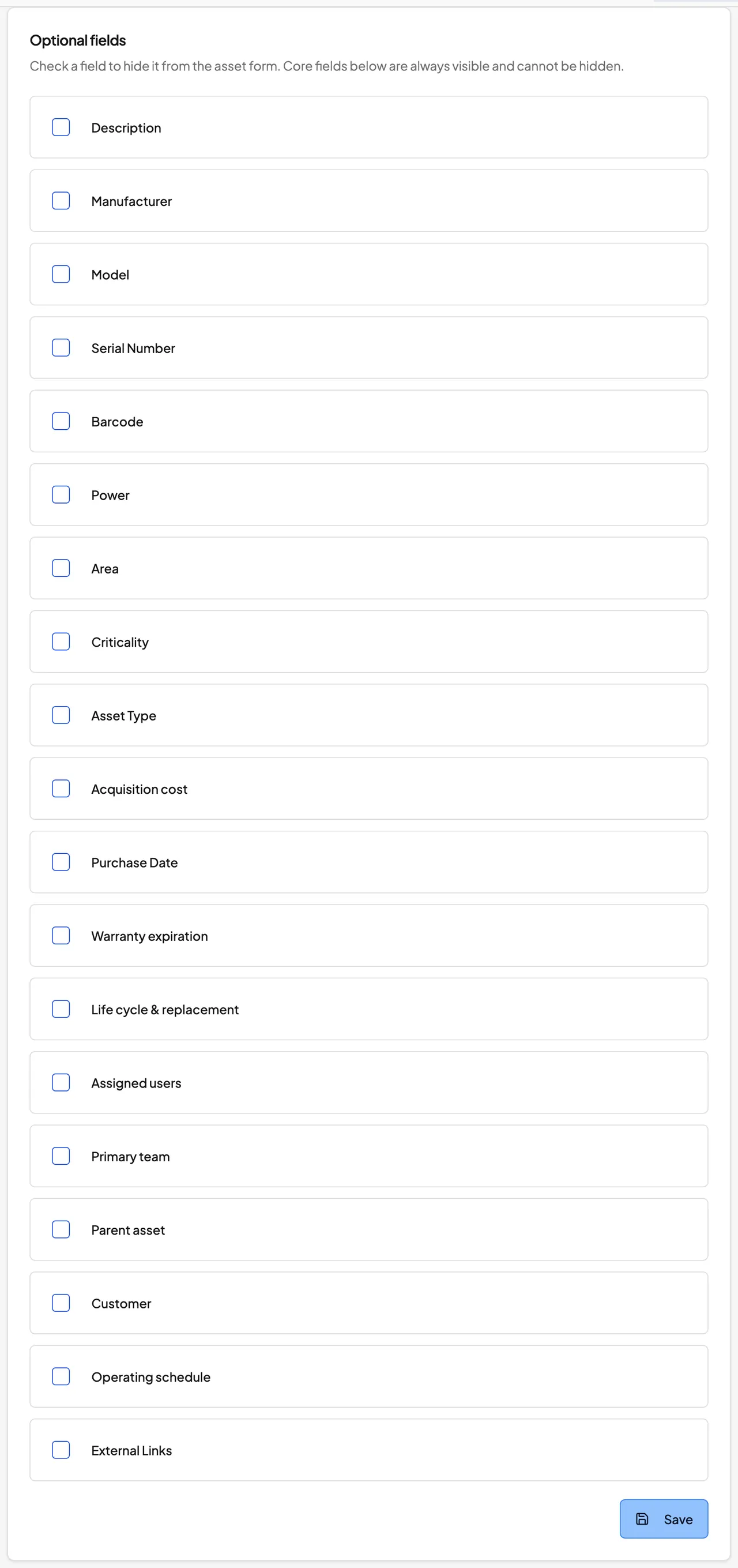
Nineteen optional asset fields can be hidden from the asset create and edit form, from the description to the warranty date; name, status, location and category always stay. Hiding applies to everyone in the company and deletes nothing: the asset's page still shows a value already entered.
In FreeMaint
Included in BusinessThe asset form in FreeMaint
Company Settings › Asset Form hides optional fields from the asset create and edit form, and asset page tabs, for the whole company. Changing it needs the Business plan; after a downgrade, hidden fields stay hidden.
Read the documentationExample
Example Plant's data dictionary
Example Plant's maintenance manager arrives with a list of “extra fields”. Most go to lists or standard fields. “Machine type” needs no field: kinds of machine are what asset categories are for. Example Plant keeps the ones a new workspace starts with, such as Production Equipment, HVAC Systems and Vehicles, which the import file of lesson 4 uses, and the asset type, Equipment, Component or Structure, gives the level. “Failure reason” becomes eight problems, such as Jam and Leak, with their causes and remedies. Manufacturer, model and warranty date are already on the asset. Nobody could say who would use the rest, so they were dropped.
The plant's codes, such as EX-L2-OVN-01 for the tunnel oven and EX-UT-CMP-01 and 02 for the air compressors, go in Barcode, with Unique asset barcodes on before the import of lesson 4. The area in the code is safe: line machines are fixed, and the forklifts, EX-WH-FLT-01 to 03, never leave the warehouse.
Three custom fields survive, which Example Plant's Business plan allows. On assets, “Food contact” (Checkbox) and, shown only when it is ticked, “Lubricant grade” (Single-choice list: Food-grade H1, Non-food grade, Other): the food-safety audit needs that list, and an asset export gives it. On work orders, “Line released after hygiene check” (Checkbox), locked to the Requester role the production supervisors hold (lesson 2), which lesson 5 lets validate work orders. It stays optional, so that the validation step can require it ticked (lesson 5): a step that only asks for an answer would accept “No”. The maintenance manager keeps company administration and can correct any of them.
Five common mistakes
- A custom field for what a category already does, such as a “Machine type” list nobody can filter on.
- A list without an “Other” option, so people pick the nearest wrong value.
- A field required at the wrong moment, such as “Line released after hygiene check” on requests: whoever reports a breakdown cannot know it yet.
- Promising that a new numbering format will tidy up old references: only new records change.
- Hiding Barcode on the asset form when it holds the client's code.
Your turn: create two custom fields
Fill in your data dictionary, then create at least two custom fields from it, on any record type. What counts: fields you created yourself that still exist when you check. What does not: a colleague's field, a field you only edited or deleted, and one created before FreeMaint began recording who creates each field.
Creating fields needs the Business plan. If you manage a Core or Starter workspace, starting this course opens a 30-day Academy trial there, once per workspace, that includes custom fields. Afterwards, fields and values stay and can still be filled in, but the fields can no longer be changed, reordered or deleted.
Template for this lesson
Data dictionary and coding rule template
Excel (.xlsx), blank, with automatic checks
Key takeaways
- Map every need to a standard field, a category or a failure code before creating a custom field.
- A custom field earns its place when you can name its use, who knows the value and when they enter it.
- Custom field values do not filter lists or feed reports: if people must filter by it, make it a category.
- Required, conditional and locked decide who answers and when: set them in the data dictionary first.
- FreeMaint generates each asset's reference; keep the client's code in Barcode, and remember that a new numbering format changes new records only.
Exercise in FreeMaint
Do it in your own FreeMaint workspace, then check it here. Required: your certificate is issued once every exercise of this course is verified.
Add two custom fields
Create at least two custom fields yourself, for example on assets or on work orders.
Required for the certificate.
Check your understanding
A few quick questions. Nothing is recorded.
Sources
- ReliaMag — How to build an asset hierarchy in a CMMS (on the ISO 14224 taxonomy)
- ISO/TC 251 — ISO 55013, Asset management: guidance on the management of data assets
- 81346.com — Frequently asked questions on the ISO/IEC 81346 series
- NIST — Standardization of maintenance data for benchmarking and asset performance analytics